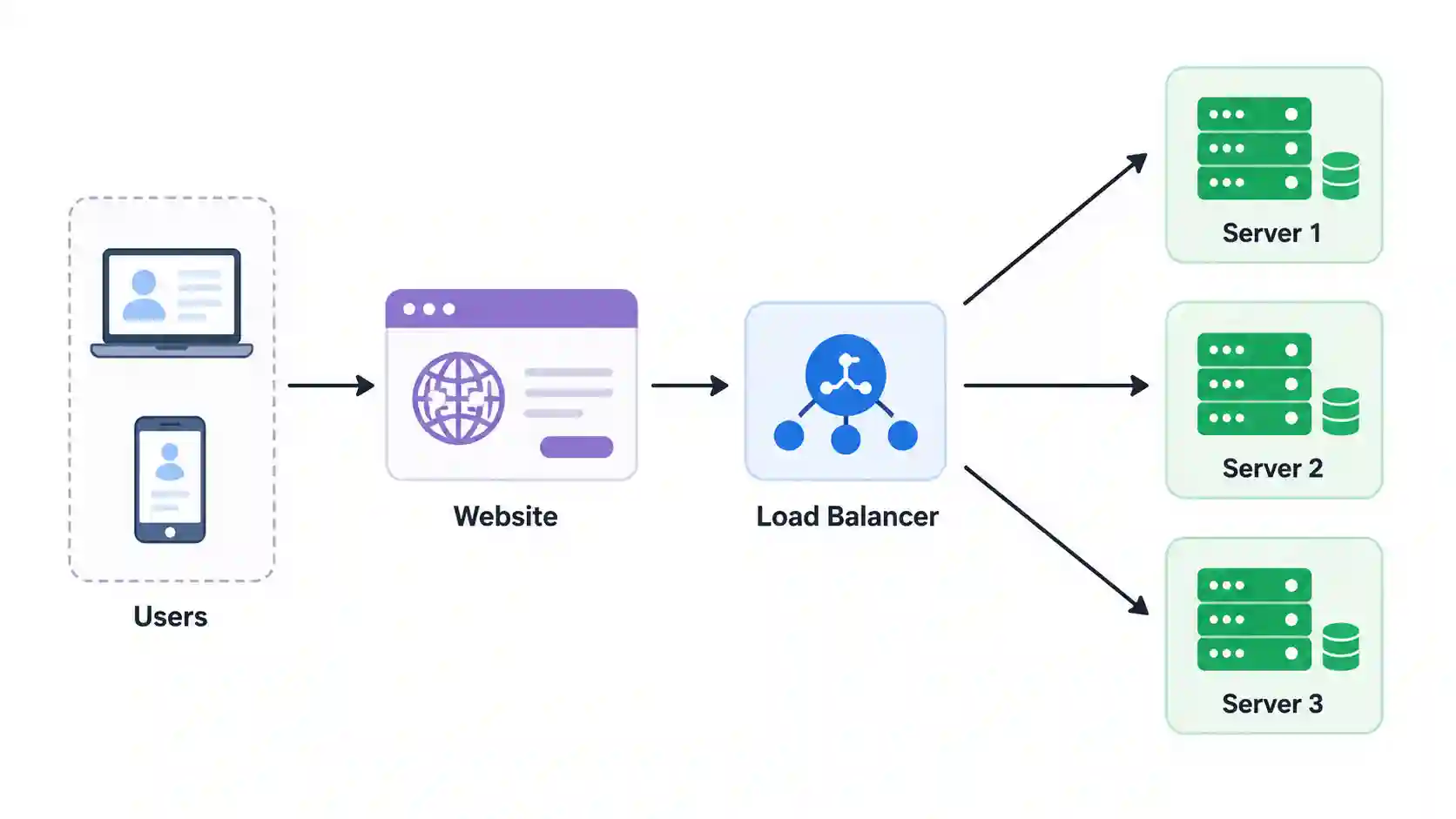
A load balancer is a networking component that sits between users and your application servers. Instead of allowing every user request to hit a single server, it intelligently distributes incoming traffic across multiple servers. This ensures that no single server becomes overloaded while others remain idle.
Think of a load balancer as the entry point to your application. Every request first reaches the load balancer, which then decides which backend server should handle it. The decision is based on factors such as server health, current workload, response time or the load balancing algorithm being used.
By spreading traffic evenly, a load balancer improves application performance, increases availability and helps applications continue running even if one or more servers fail. This is why load balancers are considered one of the fundamental building blocks of modern distributed systems.
Today, load balancers are used everywhere from small business websites to massive cloud platforms like Amazon, Netflix, Google and Facebook that serve millions of users every day.
What is Load Balancing?
Load balancing is the process of distributing incoming network requests across multiple servers instead of sending all traffic to a single machine. The primary objective is to ensure that all available resources are utilized efficiently while maintaining high application performance and reliability.
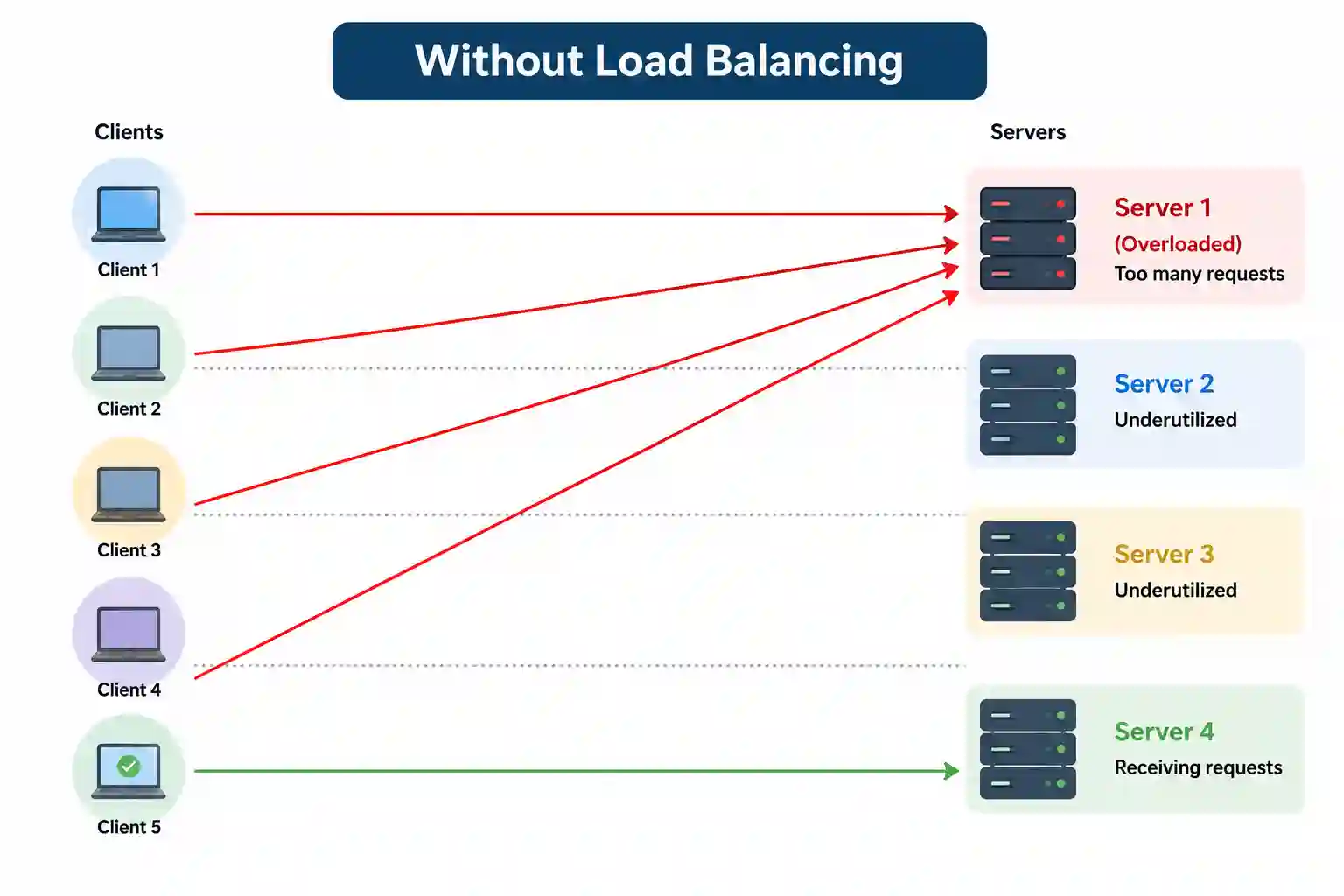
Without load balancing, one server may receive thousands of requests while other servers remain unused. As traffic increases, that overloaded server becomes slower and may eventually crash, making the application unavailable to users.
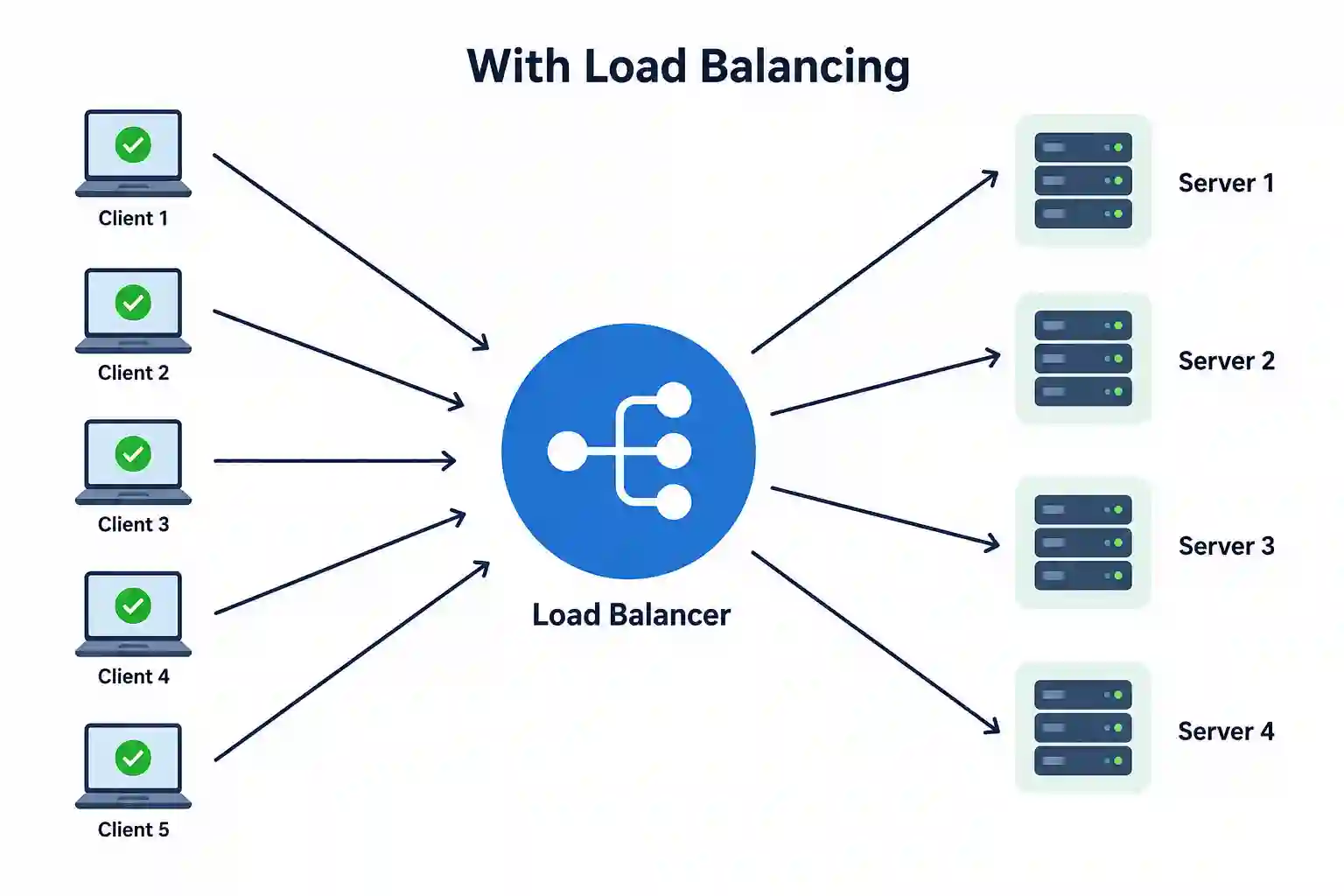
With proper load balancing, every request is directed to the most appropriate server based on predefined routing rules or algorithms. This allows applications to handle significantly more users while providing faster response times and better fault tolerance.
Load balancing also makes horizontal scaling possible. Instead of upgrading a single powerful server, organizations can simply add more servers behind a load balancer as traffic grows.
Real-Life Analogy
Imagine walking into a busy restaurant that has only one waiter serving every customer. As more customers arrive, the waiter becomes overwhelmed, service slows down and people start waiting for longer periods.
Now imagine the restaurant has five waiters. As customers enter, a manager directs each customer to the waiter who is currently available. Since the workload is shared evenly, everyone gets served much faster.
A load balancer works in exactly the same way. Instead of assigning customers to waiters, it distributes user requests across multiple servers so that no single server becomes overwhelmed.
Why Do We Need a Load Balancer?
As applications grow, the number of users and requests increases dramatically. A single server eventually reaches its limit in terms of CPU, memory, disk I/O or network bandwidth. Simply upgrading to larger hardware is not always practical or cost-effective.
A load balancer solves this problem by distributing traffic across multiple servers. This not only increases the application's capacity but also improves reliability because traffic can automatically be redirected if one server becomes unavailable.
Load balancers are therefore essential for applications that require high availability, fault tolerance and the ability to handle unpredictable traffic spikes.
Problems Without a Load Balancer
1. Single Point of Failure
When an application runs on only one server, that server becomes a single point of failure. If the server crashes due to hardware issues, software bugs or maintenance, the entire application becomes unavailable.
This downtime can result in lost revenue, poor customer experience and reduced trust in the application. For businesses that operate online, even a few minutes of downtime can have a significant financial impact.
2. Poor Scalability
As user traffic grows, a single server eventually reaches its maximum capacity. Although you can upgrade the server by adding more CPU or memory (vertical scaling), there is always a hardware limit.
Without a load balancer, adding more servers doesn't automatically improve performance because users continue sending requests to the original server. A load balancer makes horizontal scaling possible by distributing traffic across all available servers.
3. Uneven Resource Utilization
Without intelligent traffic distribution, one server may become overloaded while other servers remain mostly idle. This leads to inefficient use of computing resources and unnecessary performance bottlenecks.
Load balancers solve this by ensuring requests are shared more evenly, allowing organizations to make better use of their infrastructure.
4. Reduced Availability
If one server becomes slow or stops responding, users continue sending requests to that failed server because nothing is redirecting traffic elsewhere.
A load balancer continuously monitors server health and automatically removes unhealthy servers from rotation, ensuring users only interact with healthy servers.
How Does a Load Balancer Work?
Whenever a user opens a website or mobile application, the request doesn't go directly to the backend server. Instead, it first reaches the load balancer.
The load balancer checks the status of all available servers, determines which server is best suited to handle the request and forwards the request accordingly. Once the server processes the request, the response is returned to the user through the load balancer.
This entire process typically happens within milliseconds and is completely transparent to the user.
A simplified workflow looks like this:
A client sends a request to the application.
The request reaches the load balancer.
The load balancer checks which backend servers are healthy.
It selects the best server using a routing algorithm such as Round Robin or Least Connections.
The selected server processes the request.
The response is returned to the client.
Key Characteristics of a Load Balancer
1. Traffic Distribution
The primary responsibility of a load balancer is to distribute incoming requests across multiple servers. By ensuring that requests are shared evenly, it prevents any single server from becoming overwhelmed while improving overall application responsiveness.
Depending on the deployment, traffic can be distributed equally or based on factors such as server capacity, current connections, response time or geographical location.
2. High Availability
One of the biggest advantages of using a load balancer is improved application availability. If one server becomes unavailable because of hardware failure, software crashes or maintenance, the load balancer automatically redirects traffic to healthy servers.
Users usually don't notice these failures because requests continue to be served by the remaining servers. This minimizes downtime and ensures business continuity.
3. Scalability
Modern applications experience varying traffic throughout the day. During peak hours, additional servers may be required, while fewer servers are needed during periods of low traffic.
A load balancer makes horizontal scaling seamless by automatically distributing requests across newly added servers. This allows applications to scale up or down without affecting end users.
4. Better Resource Utilization
Without load balancing, some servers may remain idle while others become overloaded. A load balancer ensures that computing resources are utilized more efficiently by balancing requests across the available infrastructure.
This improves overall system performance while reducing unnecessary infrastructure costs.
5. Health Monitoring
Load balancers continuously monitor the health of backend servers using techniques such as HTTP requests, TCP checks or heartbeat signals.
If a server fails these health checks, it is immediately removed from the pool of available servers. Once the server becomes healthy again, it is automatically added back to the rotation.
This automated monitoring significantly improves application reliability.
6. SSL/TLS Termination
Many modern load balancers can handle SSL/TLS encryption and decryption on behalf of backend servers. This process is known as SSL termination.
Offloading encryption work from application servers reduces CPU usage and allows backend servers to focus entirely on processing business logic,
improving overall application performance.
Types of Load Balancers
Load balancers can be categorized in different ways depending on how they are deployed and how they make routing decisions. Understanding these types is important because each one is designed for a specific use case. Choosing the wrong type can lead to unnecessary complexity, higher costs or performance issues.
Broadly, load balancers are classified based on:
Deployment model
OSI network layer
Traffic routing algorithm
Let's understand each category.
Types of Load Balancers Based on Deployment
The deployment model determines where the load balancer runs and who is responsible for managing it. Depending on your infrastructure and business requirements, you can choose between hardware, software or cloud-managed load balancers.
1. Hardware Load Balancer
A hardware load balancer is a dedicated physical appliance installed inside a company's data center. Since it is purpose-built for load balancing, it offers extremely high performance, very low latency and specialized networking capabilities.
Large enterprises, banks, telecom companies and government organizations often use hardware load balancers because they handle enormous amounts of traffic while providing advanced networking and security features.
However, they are expensive to purchase, maintain and upgrade. Scaling them often requires buying additional hardware, making them less flexible than cloud-based alternatives.
Examples
F5 BIG-IP
Citrix ADC (NetScaler)
A10 Networks
Best suited for
Enterprise data centers
Financial institutions
Large on-premise infrastructure
Mission-critical applications
2. Software Load Balancer
A software load balancer performs the same job as a hardware load balancer but runs as software on a virtual machine, container or Linux server.
Because it is software-based, it is much easier to deploy, configure and scale. Most modern applications running on virtual machines, Docker containers or Kubernetes clusters use software load balancers because they integrate easily into DevOps workflows.
Another major advantage is flexibility. Since configuration is stored as code, changes can be automated through CI/CD pipelines.
Popular open-source software load balancers are capable of handling millions of requests per second while providing advanced features like SSL termination, URL routing, rate limiting, caching and WebSocket support.
Examples
NGINX
HAProxy
Traefik
Envoy Proxy
Best suited for
Web applications
Kubernetes clusters
Docker environments
Microservices architecture
3. Cloud Load Balancer
A cloud load balancer is a fully managed service provided by cloud platforms such as AWS, Azure and Google Cloud. Instead of installing or maintaining load balancing software yourself, the cloud provider manages everything, including availability, scaling, maintenance and upgrades.
One of the biggest advantages is automatic scaling. During traffic spikes, cloud load balancers automatically handle increased requests without requiring manual intervention.
Cloud load balancers also integrate with other cloud services such as Auto Scaling Groups, virtual machines, serverless applications, containers and Kubernetes.
Because of their simplicity and reliability, cloud load balancers have become the preferred choice for most cloud-native applications.
Examples
AWS Elastic Load Balancer (ELB)
Azure Load Balancer
Google Cloud Load Balancer
Best suited for
Cloud-native applications
Microservices
Serverless architecture
Auto Scaling environments
Types of Load Balancers Based on the OSI Model
Another common way to classify load balancers is by the network layer where they make routing decisions.
The two most common types are Layer 4 and Layer 7 load balancers.
1. Layer 4 (Transport Layer) Load Balancer
A Layer 4 load balancer operates at the Transport Layer of the OSI model. Instead of looking inside the request, it only examines networking information such as source IP address, destination IP address, TCP ports and UDP ports.
Since it doesn't inspect application data, it can forward requests very quickly with minimal processing overhead. This makes Layer 4 load balancers ideal for applications where speed and throughput are more important than content-aware routing.
For example, if an incoming TCP request arrives on port 443, the load balancer forwards it to one of the backend servers without checking whether the request is for /login, /products or /checkout.
Advantages
Extremely fast
Low latency
Handles millions of TCP/UDP connections
Lower resource usage
Limitations
Cannot inspect HTTP headers
Cannot route based on URLs
Cannot route based on cookies
Common Use Cases
Gaming servers
Database clusters
Streaming services
TCP/UDP applications
2. Layer 7 (Application Layer) Load Balancer
A Layer 7 load balancer understands application-level protocols such as HTTP and HTTPS. Instead of forwarding requests purely based on IP addresses, it examines information inside the request before deciding where to send it.
This allows much smarter routing decisions.
For example:
example.com/api/*
can be routed to API servers.
While
example.com/images/*
can be routed to image servers.
Similarly,
example.com/admin/*
can be sent only to secure admin servers.
This flexibility makes Layer 7 load balancers the preferred choice for modern web applications and microservices.
Advantages
URL-based routing
Header-based routing
Cookie-based routing
SSL termination
Authentication support
Web Application Firewall integration
Limitations
Slightly higher latency than Layer 4
More CPU-intensive
Common Use Cases
REST APIs
E-commerce websites
SaaS applications
Microservices
Kubernetes Ingress
Layer 4 vs Layer 7 Load Balancer
Feature
Layer 4
Layer 7
OSI Layer
Transport Layer
Application Layer
Protocols
TCP, UDP
HTTP, HTTPS, gRPC
Routing
IP Address and Port
URL, Headers, Cookies
Speed
Faster
Slightly slower
SSL Termination
Limited
Supported
Content Awareness
No
Yes
Best For
High-performance networking
Web applications and APIs
Load Balancing Algorithms
A load balancer doesn't randomly send requests to servers. Instead, it follows predefined algorithms that determine which server should receive the next request.
Different algorithms are suitable for different workloads.
1. Round Robin
Round Robin is the simplest and most widely used load balancing algorithm.
It sends requests to servers one after another in a circular order.
For example, if there are three servers:
Request 1 → Server A
Request 2 → Server B
Request 3 → Server C
Request 4 → Server A
This works well when all servers have identical hardware and similar workloads.
Best For
Equal-capacity servers
Small applications
Web servers
2. Weighted Round Robin
Sometimes not every server has the same capacity.
One server may have:
32 CPU cores
Another may have:
8 CPU cores
Weighted Round Robin assigns higher weights to more powerful servers.
Example
Server A (Weight 5)
Server B (Weight 2)
Server C (Weight 1)
Server A receives more requests because it has greater processing capacity.
3. Least Connections
Instead of counting requests, this algorithm sends new requests to the server with the fewest active connections.
This is useful when request processing times vary significantly.
Imagine:
Server A has
5 Active Connections
Server B has
80 Active Connections
The next request goes to Server A.
This algorithm performs better than Round Robin for long-running user sessions.
4. Least Response Time
Some servers may technically be healthy but respond much slower than others.
Least Response Time continuously monitors server latency and forwards requests to the fastest responding server.
This improves user experience during heavy traffic.
5. IP Hash
IP Hash uses the client's IP address to determine which backend server should handle the request.
The same client is consistently routed to the same server unless that server becomes unavailable.
This helps maintain session consistency without enabling sticky sessions.
6. Random
The Random algorithm simply selects a backend server randomly.
Although rarely used in production, it can work well for simple systems where all servers have identical performance.
Frequently Asked Questions (FAQs)
1. Why do we need a load balancer?
A load balancer prevents any single server from becoming overloaded by distributing incoming requests across multiple servers. This improves application performance, increases availability and allows systems to scale as traffic grows.
2. Can a load balancer improve website performance?
Yes. Since requests are distributed across multiple servers, response times improve and users experience fewer delays. Many load balancers also support SSL termination, compression and connection reuse, which further improve performance.
3. Is a load balancer the same as a reverse proxy?
No. A reverse proxy primarily forwards client requests to backend servers and can provide features such as caching, SSL termination and request filtering. A load balancer focuses on distributing traffic across multiple backend servers. In practice, many modern tools such as NGINX, HAProxy and Envoy perform both roles.
4. What happens if the load balancer itself fails?
If there is only one load balancer, it can become a single point of failure. Production systems typically deploy multiple load balancers across different Availability Zones or data centers with health checks and automatic failover to eliminate this risk.
5. Does a load balancer store user sessions?
By default, most load balancers are stateless and do not store user sessions. If an application requires users to remain on the same server, you can enable sticky sessions (session affinity) or, preferably, store session data in a shared service such as Redis or a database.
6. Which load balancer should I use?
The choice depends on your environment:
NGINX or HAProxy for self-managed Linux servers.
AWS Application Load Balancer (ALB) for HTTP/HTTPS applications and microservices.
AWS Network Load Balancer (NLB) for high-performance TCP/UDP workloads.
Kubernetes Ingress Controller (NGINX, Traefik or Envoy) for Kubernetes clusters.
Cloud-managed load balancers if you want minimal operational overhead and automatic scaling.
7. What is SSL termination?
SSL termination is the process where the load balancer decrypts incoming HTTPS traffic before forwarding it to backend servers. This reduces the CPU load on application servers, simplifies certificate management and centralizes HTTPS configuration.
8. Can a load balancer route traffic based on URLs?
Yes, Layer 7 (Application Layer) load balancers can inspect HTTP requests and route traffic based on URLs, headers, cookies or hostnames. For example, requests to /api can go to API servers while /images requests go to image servers.
9. Can a load balancer work with containers and Kubernetes?
Absolutely. Kubernetes relies heavily on load balancing to expose applications. Services such as LoadBalancer and Ingress controllers distribute traffic across pods, while cloud providers integrate with managed load balancers like AWS ALB or Azure Load Balancer.
10. Which load balancing algorithm is best?
There is no universally "best" algorithm. Round Robin works well when servers have similar capacity, Weighted Round Robin is ideal for mixed hardware, Least Connections suits applications with long-lived sessions and Least Response Time helps optimize user experience when server response times vary. The right choice depends on your application's workload and traffic patterns.
"}}},"blogDetails":{"isWriter":false,"likes":0,"isLikedByUser":false,"tagIds":[189,291,292,454,517,526,527],"tags":[{"id":189,"name":"System Design","maskingName":"system-design","isFeatured":true},{"id":291,"name":"Distributed System","maskingName":"distributed-system","isFeatured":false},{"id":292,"name":"Scalability","maskingName":"scalability","isFeatured":false},{"id":454,"name":"System Design Interview","maskingName":"system-design-interview","isFeatured":true},{"id":517,"name":"Cloud Architecture","maskingName":"cloud-architecture","isFeatured":false},{"id":526,"name":"Load Balancing","maskingName":"load-balancing","isFeatured":false},{"id":527,"name":"Load Balancer","maskingName":"load-balancer","isFeatured":false}],"comments":[],"bookmark":{"isBookmarked":false,"count":0},"author":{"userId":"MjlfNF84LVsxODVdMm4tdENfQU5nZV9fSXQ=","name":"Sarthak Sharma"},"viewCount":464,"showBannerImage":false,"seoTags":"load balancer, load balancing, load balancer in system design, load balancing algorithms, Layer 4 load balancer, Layer 7 load balancer, hardware load balancer, software load balancer, cloud load balancer, reverse proxy vs load balancer, round robin, weighted round robin, least connections, least response time, IP hash, SSL termination, health checks, horizontal scaling, high availability, fault tolerance, distributed systems, microservices, Kubernetes Ingress, AWS ALB, AWS NLB, NGINX, HAProxy, Envoy, Traefik, system design tutorial","content":"
A load balancer is a networking component that sits between users and your application servers. Instead of allowing every user request to hit a single server, it intelligently distributes incoming traffic across multiple servers. This ensures that no single server becomes overloaded while others remain idle.
\n
Think of a load balancer as the entry point to your application. Every request first reaches the load balancer, which then decides which backend server should handle it. The decision is based on factors such as server health, current workload, response time or the load balancing algorithm being used.
\n
By spreading traffic evenly, a load balancer improves application performance, increases availability and helps applications continue running even if one or more servers fail. This is why load balancers are considered one of the fundamental building blocks of modern distributed systems.
\n
Today, load balancers are used everywhere from small business websites to massive cloud platforms like Amazon, Netflix, Google and Facebook that serve millions of users every day.
\n\n
\n\n
What is Load Balancing?
\n
Load balancing is the process of distributing incoming network requests across multiple servers instead of sending all traffic to a single machine. The primary objective is to ensure that all available resources are utilized efficiently while maintaining high application performance and reliability.
\n
Without load balancing, one server may receive thousands of requests while other servers remain unused. As traffic increases, that overloaded server becomes slower and may eventually crash, making the application unavailable to users.
\n
With proper load balancing, every request is directed to the most appropriate server based on predefined routing rules or algorithms. This allows applications to handle significantly more users while providing faster response times and better fault tolerance.
\n
Load balancing also makes horizontal scaling possible. Instead of upgrading a single powerful server, organizations can simply add more servers behind a load balancer as traffic grows.
\n\n
\n\n\n
\n\n
Real-Life Analogy
\n
Imagine walking into a busy restaurant that has only one waiter serving every customer. As more customers arrive, the waiter becomes overwhelmed, service slows down and people start waiting for longer periods.
\n
Now imagine the restaurant has five waiters. As customers enter, a manager directs each customer to the waiter who is currently available. Since the workload is shared evenly, everyone gets served much faster.
\n
A load balancer works in exactly the same way. Instead of assigning customers to waiters, it distributes user requests across multiple servers so that no single server becomes overwhelmed.
\n
Why Do We Need a Load Balancer?
\n
As applications grow, the number of users and requests increases dramatically. A single server eventually reaches its limit in terms of CPU, memory, disk I/O or network bandwidth. Simply upgrading to larger hardware is not always practical or cost-effective.
\n
A load balancer solves this problem by distributing traffic across multiple servers. This not only increases the application's capacity but also improves reliability because traffic can automatically be redirected if one server becomes unavailable.
\n
Load balancers are therefore essential for applications that require high availability, fault tolerance and the ability to handle unpredictable traffic spikes.
\n
Problems Without a Load Balancer
\n
\n
1. Single Point of Failure
\n
When an application runs on only one server, that server becomes a single point of failure. If the server crashes due to hardware issues, software bugs or maintenance, the entire application becomes unavailable.
\n
This downtime can result in lost revenue, poor customer experience and reduced trust in the application. For businesses that operate online, even a few minutes of downtime can have a significant financial impact.
\n
2. Poor Scalability
\n
As user traffic grows, a single server eventually reaches its maximum capacity. Although you can upgrade the server by adding more CPU or memory (vertical scaling), there is always a hardware limit.
\n
Without a load balancer, adding more servers doesn't automatically improve performance because users continue sending requests to the original server. A load balancer makes horizontal scaling possible by distributing traffic across all available servers.
\n
3. Uneven Resource Utilization
\n
Without intelligent traffic distribution, one server may become overloaded while other servers remain mostly idle. This leads to inefficient use of computing resources and unnecessary performance bottlenecks.
\n
Load balancers solve this by ensuring requests are shared more evenly, allowing organizations to make better use of their infrastructure.
\n
4. Reduced Availability
\n
If one server becomes slow or stops responding, users continue sending requests to that failed server because nothing is redirecting traffic elsewhere.
\n
A load balancer continuously monitors server health and automatically removes unhealthy servers from rotation, ensuring users only interact with healthy servers.
\n
\n
How Does a Load Balancer Work?
\n
Whenever a user opens a website or mobile application, the request doesn't go directly to the backend server. Instead, it first reaches the load balancer.
\n
The load balancer checks the status of all available servers, determines which server is best suited to handle the request and forwards the request accordingly. Once the server processes the request, the response is returned to the user through the load balancer.
\n
This entire process typically happens within milliseconds and is completely transparent to the user.
\n
A simplified workflow looks like this:
\n\n
A client sends a request to the application.
\n
The request reaches the load balancer.
\n
The load balancer checks which backend servers are healthy.
\n
It selects the best server using a routing algorithm such as Round Robin or Least Connections.
\n
The selected server processes the request.
\n
The response is returned to the client.
\n\n
Key Characteristics of a Load Balancer
\n
\n
1. Traffic Distribution
\n
The primary responsibility of a load balancer is to distribute incoming requests across multiple servers. By ensuring that requests are shared evenly, it prevents any single server from becoming overwhelmed while improving overall application responsiveness.
\n
Depending on the deployment, traffic can be distributed equally or based on factors such as server capacity, current connections, response time or geographical location.
\n
2. High Availability
\n
One of the biggest advantages of using a load balancer is improved application availability. If one server becomes unavailable because of hardware failure, software crashes or maintenance, the load balancer automatically redirects traffic to healthy servers.
\n
Users usually don't notice these failures because requests continue to be served by the remaining servers. This minimizes downtime and ensures business continuity.
\n
3. Scalability
\n
Modern applications experience varying traffic throughout the day. During peak hours, additional servers may be required, while fewer servers are needed during periods of low traffic.
\n
A load balancer makes horizontal scaling seamless by automatically distributing requests across newly added servers. This allows applications to scale up or down without affecting end users.
\n
4. Better Resource Utilization
\n
Without load balancing, some servers may remain idle while others become overloaded. A load balancer ensures that computing resources are utilized more efficiently by balancing requests across the available infrastructure.
\n
This improves overall system performance while reducing unnecessary infrastructure costs.
\n
5. Health Monitoring
\n
Load balancers continuously monitor the health of backend servers using techniques such as HTTP requests, TCP checks or heartbeat signals.
\n
If a server fails these health checks, it is immediately removed from the pool of available servers. Once the server becomes healthy again, it is automatically added back to the rotation.
\n
This automated monitoring significantly improves application reliability.
\n
6. SSL/TLS Termination
\n
Many modern load balancers can handle SSL/TLS encryption and decryption on behalf of backend servers. This process is known as SSL termination.
\n
Offloading encryption work from application servers reduces CPU usage and allows backend servers to focus entirely on processing business logic,\nimproving overall application performance.
\n
\n
Types of Load Balancers
\n
Load balancers can be categorized in different ways depending on how they are deployed and how they make routing decisions. Understanding these types is important because each one is designed for a specific use case. Choosing the wrong type can lead to unnecessary complexity, higher costs or performance issues.
\n
Broadly, load balancers are classified based on:
\n
\n
Deployment model
\n
OSI network layer
\n
Traffic routing algorithm
\n
\n
Let's understand each category.
\n
Types of Load Balancers Based on Deployment
\n
The deployment model determines where the load balancer runs and who is responsible for managing it. Depending on your infrastructure and business requirements, you can choose between hardware, software or cloud-managed load balancers.
\n
\n
1. Hardware Load Balancer
\n
A hardware load balancer is a dedicated physical appliance installed inside a company's data center. Since it is purpose-built for load balancing, it offers extremely high performance, very low latency and specialized networking capabilities.
\n
Large enterprises, banks, telecom companies and government organizations often use hardware load balancers because they handle enormous amounts of traffic while providing advanced networking and security features.
\n
However, they are expensive to purchase, maintain and upgrade. Scaling them often requires buying additional hardware, making them less flexible than cloud-based alternatives.
\n
Examples
\n
\n
F5 BIG-IP
\n
Citrix ADC (NetScaler)
\n
A10 Networks
\n
\n
Best suited for
\n
\n
Enterprise data centers
\n
Financial institutions
\n
Large on-premise infrastructure
\n
Mission-critical applications
\n
\n
2. Software Load Balancer
\n
A software load balancer performs the same job as a hardware load balancer but runs as software on a virtual machine, container or Linux server.
\n
Because it is software-based, it is much easier to deploy, configure and scale. Most modern applications running on virtual machines, Docker containers or Kubernetes clusters use software load balancers because they integrate easily into DevOps workflows.
\n
Another major advantage is flexibility. Since configuration is stored as code, changes can be automated through CI/CD pipelines.
\n
Popular open-source software load balancers are capable of handling millions of requests per second while providing advanced features like SSL termination, URL routing, rate limiting, caching and WebSocket support.
\n
Examples
\n
\n
NGINX
\n
HAProxy
\n
Traefik
\n
Envoy Proxy
\n
\n
Best suited for
\n
\n
Web applications
\n
Kubernetes clusters
\n
Docker environments
\n
Microservices architecture
\n
\n
3. Cloud Load Balancer
\n
A cloud load balancer is a fully managed service provided by cloud platforms such as AWS, Azure and Google Cloud. Instead of installing or maintaining load balancing software yourself, the cloud provider manages everything, including availability, scaling, maintenance and upgrades.
\n
One of the biggest advantages is automatic scaling. During traffic spikes, cloud load balancers automatically handle increased requests without requiring manual intervention.
\n
Cloud load balancers also integrate with other cloud services such as Auto Scaling Groups, virtual machines, serverless applications, containers and Kubernetes.
\n
Because of their simplicity and reliability, cloud load balancers have become the preferred choice for most cloud-native applications.
\n
Examples
\n
\n
AWS Elastic Load Balancer (ELB)
\n
Azure Load Balancer
\n
Google Cloud Load Balancer
\n
\n
Best suited for
\n
\n
Cloud-native applications
\n
Microservices
\n
Serverless architecture
\n
Auto Scaling environments
\n
\n
\n
Types of Load Balancers Based on the OSI Model
\n
Another common way to classify load balancers is by the network layer where they make routing decisions.\nThe two most common types are Layer 4 and Layer 7 load balancers.
\n
\n
1. Layer 4 (Transport Layer) Load Balancer
\n
A Layer 4 load balancer operates at the Transport Layer of the OSI model. Instead of looking inside the request, it only examines networking information such as source IP address, destination IP address, TCP ports and UDP ports.
\n
Since it doesn't inspect application data, it can forward requests very quickly with minimal processing overhead. This makes Layer 4 load balancers ideal for applications where speed and throughput are more important than content-aware routing.
\n
For example, if an incoming TCP request arrives on port 443, the load balancer forwards it to one of the backend servers without checking whether the request is for /login, /products or /checkout.
\n
Advantages
\n
\n
Extremely fast
\n
Low latency
\n
Handles millions of TCP/UDP connections
\n
Lower resource usage
\n
\n
Limitations
\n
\n
Cannot inspect HTTP headers
\n
Cannot route based on URLs
\n
Cannot route based on cookies
\n
\n
Common Use Cases
\n
\n
Gaming servers
\n
Database clusters
\n
Streaming services
\n
TCP/UDP applications
\n
\n
2. Layer 7 (Application Layer) Load Balancer
\n
A Layer 7 load balancer understands application-level protocols such as HTTP and HTTPS. Instead of forwarding requests purely based on IP addresses, it examines information inside the request before deciding where to send it.\nThis allows much smarter routing decisions.
\n
For example:
\n
example.com/api/*
\n
can be routed to API servers.
\n
While
\n
example.com/images/*
\n
can be routed to image servers.
\n
Similarly,
\n
example.com/admin/*
\n
can be sent only to secure admin servers.
\n
This flexibility makes Layer 7 load balancers the preferred choice for modern web applications and microservices.
\n
Advantages
\n
\n
URL-based routing
\n
Header-based routing
\n
Cookie-based routing
\n
SSL termination
\n
Authentication support
\n
Web Application Firewall integration
\n
\n
Limitations
\n
\n
Slightly higher latency than Layer 4
\n
More CPU-intensive
\n
\n
Common Use Cases
\n
\n
REST APIs
\n
E-commerce websites
\n
SaaS applications
\n
Microservices
\n
Kubernetes Ingress
\n
\n
Layer 4 vs Layer 7 Load Balancer
\n
\n
\n\n
\n
Feature
\n
Layer 4
\n
Layer 7
\n
\n\n\n
\n
OSI Layer
\n
Transport Layer
\n
Application Layer
\n
\n
\n
Protocols
\n
TCP, UDP
\n
HTTP, HTTPS, gRPC
\n
\n
\n
Routing
\n
IP Address and Port
\n
URL, Headers, Cookies
\n
\n
\n
Speed
\n
Faster
\n
Slightly slower
\n
\n
\n
SSL Termination
\n
Limited
\n
Supported
\n
\n
\n
Content Awareness
\n
No
\n
Yes
\n
\n
\n
Best For
\n
High-performance networking
\n
Web applications and APIs
\n
\n\n
\n
\n
\n
Load Balancing Algorithms
\n
A load balancer doesn't randomly send requests to servers. Instead, it follows predefined algorithms that determine which server should receive the next request.
\n
Different algorithms are suitable for different workloads.
\n
\n
1. Round Robin
\n
Round Robin is the simplest and most widely used load balancing algorithm.\nIt sends requests to servers one after another in a circular order.
\n
For example, if there are three servers:
\n
\n
Request 1 → Server A
\n
Request 2 → Server B
\n
Request 3 → Server C
\n
Request 4 → Server A
\n
\n
This works well when all servers have identical hardware and similar workloads.
\n
Best For
\n
\n
Equal-capacity servers
\n
Small applications
\n
Web servers
\n
\n
2. Weighted Round Robin
\n
Sometimes not every server has the same capacity.\nOne server may have:
\n
\n
32 CPU cores
\n
\n
Another may have:
\n
\n
8 CPU cores
\n
\n
Weighted Round Robin assigns higher weights to more powerful servers.
\n
Example
\n
\n
Server A (Weight 5)
\n
Server B (Weight 2)
\n
Server C (Weight 1)
\n
\n
Server A receives more requests because it has greater processing capacity.
\n
3. Least Connections
\n
Instead of counting requests, this algorithm sends new requests to the server with the fewest active connections.\nThis is useful when request processing times vary significantly.
\n
Imagine:
\n
Server A has
\n
\n
5 Active Connections
\n
\n
Server B has
\n
\n
80 Active Connections
\n
\n
The next request goes to Server A.
\n
This algorithm performs better than Round Robin for long-running user sessions.
\n
4. Least Response Time
\n
Some servers may technically be healthy but respond much slower than others.\nLeast Response Time continuously monitors server latency and forwards requests to the fastest responding server.\nThis improves user experience during heavy traffic.
\n
5. IP Hash
\n
IP Hash uses the client's IP address to determine which backend server should handle the request.\nThe same client is consistently routed to the same server unless that server becomes unavailable.\nThis helps maintain session consistency without enabling sticky sessions.
\n
6. Random
\n
The Random algorithm simply selects a backend server randomly.\nAlthough rarely used in production, it can work well for simple systems where all servers have identical performance.
\n
\n
Frequently Asked Questions (FAQs)
\n
\n
1. Why do we need a load balancer?
\n
A load balancer prevents any single server from becoming overloaded by distributing incoming requests across multiple servers. This improves application performance, increases availability and allows systems to scale as traffic grows.
\n
2. Can a load balancer improve website performance?
\n
Yes. Since requests are distributed across multiple servers, response times improve and users experience fewer delays. Many load balancers also support SSL termination, compression and connection reuse, which further improve performance.
\n
3. Is a load balancer the same as a reverse proxy?
\n
No. A reverse proxy primarily forwards client requests to backend servers and can provide features such as caching, SSL termination and request filtering. A load balancer focuses on distributing traffic across multiple backend servers. In practice, many modern tools such as NGINX, HAProxy and Envoy perform both roles.
\n
4. What happens if the load balancer itself fails?
\n
If there is only one load balancer, it can become a single point of failure. Production systems typically deploy multiple load balancers across different Availability Zones or data centers with health checks and automatic failover to eliminate this risk.
\n
5. Does a load balancer store user sessions?
\n
By default, most load balancers are stateless and do not store user sessions. If an application requires users to remain on the same server, you can enable sticky sessions (session affinity) or, preferably, store session data in a shared service such as Redis or a database.
\n
6. Which load balancer should I use?
\n
The choice depends on your environment:
\n
\n
NGINX or HAProxy for self-managed Linux servers.
\n
AWS Application Load Balancer (ALB) for HTTP/HTTPS applications and microservices.
\n
AWS Network Load Balancer (NLB) for high-performance TCP/UDP workloads.
\n
Kubernetes Ingress Controller (NGINX, Traefik or Envoy) for Kubernetes clusters.
\n
Cloud-managed load balancers if you want minimal operational overhead and automatic scaling.
\n
\n
7. What is SSL termination?
\n
SSL termination is the process where the load balancer decrypts incoming HTTPS traffic before forwarding it to backend servers. This reduces the CPU load on application servers, simplifies certificate management and centralizes HTTPS configuration.
\n
8. Can a load balancer route traffic based on URLs?
\n
Yes, Layer 7 (Application Layer) load balancers can inspect HTTP requests and route traffic based on URLs, headers, cookies or hostnames. For example, requests to /api can go to API servers while /images requests go to image servers.
\n
9. Can a load balancer work with containers and Kubernetes?
\n
Absolutely. Kubernetes relies heavily on load balancing to expose applications. Services such as LoadBalancer and Ingress controllers distribute traffic across pods, while cloud providers integrate with managed load balancers like AWS ALB or Azure Load Balancer.
\n
10. Which load balancing algorithm is best?
\n
There is no universally \"best\" algorithm. Round Robin works well when servers have similar capacity, Weighted Round Robin is ideal for mixed hardware, Least Connections suits applications with long-lived sessions and Least Response Time helps optimize user experience when server response times vary. The right choice depends on your application's workload and traffic patterns.
\n
","categoryId":527,"subCategoryId":527,"contentFormat":5,"blogId":170,"userId":"MjlfNF84LVsxODVdMm4tdENfQU5nZV9fSXQ=","title":"Load Balancer in System Design: Complete Beginner to Advanced Guide","url":"load-balancer-in-system-design-complete-beginner-to-advanced-guide","bannerImage":"","seoDescription":"Learn load balancers in system design with types, algorithms, Layer 4 vs Layer 7, health checks, SSL termination, scalability and real-world examples.","generatedOn":"2026-07-23T15:10:18","updatedOn":"2026-07-23T15:10:18"},"popularContents":[{"id":165,"title":"Top 50+ SQL Interview Questions and Answers for Intermediate to Advanced","url":"top-sql-interview-questions-and-answers-for-intermediate-to-advanced","description":null,"seoDescription":"Top SQL Interview Questions and Answers for Intermediate to Advanced. Top SQL Interview Questions for experience. Frequently asked SQL interview questions with answers","contentType":2,"generatedOn":"2026-10-06T22:55:21.7097737Z","viewCount":0},{"id":197,"title":"My Adobe SDE Interview Experience (Aug 2026) 5 Rounds, Selected","url":"my-adobe-sde-interview-experience-aug-2026-5-rounds-selected","description":null,"seoDescription":"Real Adobe SDE interview: 5 rounds, 4 DSA problems (Rotate Array, BSTs, Kth Smallest Matrix), code review & behavioral round. Full solutions + tips.","contentType":5,"generatedOn":"2026-10-06T22:55:21.7103929Z","viewCount":0},{"id":135,"title":"Spinny SDE-1 Interview Experience (Selected)","url":"spinny-sde-1-interview-experience-selected","description":null,"seoDescription":"Spinny SDE-1 Interview Experience (Selected) | 4 Rounds Breakdown: Coding, LLD, Java, SQL + Real Interview Questions","contentType":5,"generatedOn":"2026-10-06T22:55:21.7103825Z","viewCount":0},{"id":34,"title":"System Design Deep Dive: 25 Essential Interview Questions","url":"system-design-deep-dive-25-essential-interview-questions","description":null,"seoDescription":"","contentType":5,"generatedOn":"2026-10-06T22:55:21.7103714Z","viewCount":0},{"id":122,"title":"Zepto SDE-1 Interview Experience (Backend Developer) : Real DSA, LLD, Chess Game Design","url":"zepto-sde-1-interview-experience-backend-developer-real-dsa-lld-chess-game-design","description":null,"seoDescription":" Zepto SDE-1 Backend Interview Experience covering DSA, Dynamic Programming, LLD, API Design, DB Schema, OOP & Product Company Rounds.","contentType":5,"generatedOn":"2026-10-06T22:55:21.7103756Z","viewCount":0},{"id":167,"title":"Meesho SDE-1 Online Assessment Interview Experience (Remote) - Rejected","url":"meesho-sde-1-online-assessment-interview-experience-remote-rejected","description":null,"seoDescription":"Read a real Meesho SDE-1 online assessment experience with coding questions, DSA topics, solutions, difficulty level, preparation tips and interview insights.","contentType":5,"generatedOn":"2026-10-06T22:55:21.7103859Z","viewCount":0},{"id":168,"title":"Amazon SDE-2 Interview Experience (3 Years Experience)","url":"amazon-sde-2-interview-experience-3-years-experience","description":null,"seoDescription":" Read a real Amazon SDE-2 interview experience covering the online assessment, coding rounds, object-oriented design, leadership principles and system design.","contentType":5,"generatedOn":"2026-10-06T22:55:21.710388Z","viewCount":0},{"id":173,"title":"Uber SDE-2 Interview Experience : LLD, HLD, DSA & Hiring Manager Round","url":"uber-sde-2-interview-experience-lld-hld-dsa-hiring-manager-round","description":null,"seoDescription":"Read a real Uber SDE-2 interview experience covering DSA, low-level design, high-level system design, behavioral rounds, hiring freeze and key takeaways.","contentType":5,"generatedOn":"2026-10-06T22:55:21.7103912Z","viewCount":0},{"id":172,"title":"Google L4 Software Engineer III interview experience | Selected","url":"google-l4-software-engineer-iii-interview-experience-selected","description":null,"seoDescription":"Google L4 Software Engineer III interview experience with API design, Googlyness, route matching, graph coding rounds, follow-up questions and tips.","contentType":5,"generatedOn":"2026-10-06T22:55:21.7103897Z","viewCount":0},{"id":153,"title":"Visa Software Engineer 1 (SDE-1) Interview Experience | CodeSignal OA + Graph-Based Technical Rounds","url":"visa-software-engineer-1-sde-1-interview-experience-codesignal-oa-graph-based-technical-rounds","description":null,"seoDescription":" Ace your Visa SDE-1 interview with this complete interview experience covering CodeSignal OA, graph coding rounds, hiring manager questions and tips.","contentType":5,"generatedOn":"2026-10-06T22:55:21.7103843Z","viewCount":0}],"latestContents":[{"id":219,"title":"6 Tools That Made My Life Easier as a Software Engineer","url":"6-tools-that-made-my-life-easier-as-a-software-engineer","description":null,"seoDescription":"The 6 developer tools I use daily as a software engineer: Git, VS Code, Docker, Postman, Chrome DevTools, and AI assistants, with real tips, mistakes, and trade","contentType":5,"generatedOn":"2026-10-06T22:55:21.7096865Z","viewCount":0},{"id":218,"title":"When Should a Business Use Multiple AI Agents Instead of One?","url":"when-should-a-business-use-multiple-ai-agents-instead-of-one","description":null,"seoDescription":"Single agent or multi-agent AI? Learn the 4 signals that justify splitting agents by knowledge, permissions, and risk, plus routing and handoff tips.","contentType":5,"generatedOn":"2026-10-06T22:55:21.7096913Z","viewCount":0},{"id":216,"title":"AI in Clinical Trials Market Estimated to Experience a Hike in Growth by 2035","url":"ai-in-clinical-trials-market-estimated-to-experience-a-hike-in-growth-by-2035","description":null,"seoDescription":"The exclusive information about market dynamics serves as a valuable guide to predict economic scenarios and initiatives taken to enhance future growth. Our mar","contentType":5,"generatedOn":"2026-10-06T22:55:21.7096924Z","viewCount":0},{"id":217,"title":"AI in Clinical Trials Market Estimated to Experience a Hike in Growth by 2035","url":"ai-in-clinical-trials-market-estimated-to-experience-a-hike-in-growth-by-2035","description":null,"seoDescription":"The exclusive information about market dynamics serves as a valuable guide to predict economic scenarios and initiatives taken to enhance future growth. Our mar","contentType":5,"generatedOn":"2026-10-06T22:55:21.7096934Z","viewCount":0},{"id":215,"title":"What Happens When an AI Agent Doesn't Know the Answer?","url":"what-happens-when-an-ai-agent-doesnt-know-the-answer","description":null,"seoDescription":"Most AI agents fail quietly. They guess instead of saying \"I don't know.\" Here's how to design better fallback and human-handoff behavior.","contentType":5,"generatedOn":"2026-10-06T22:55:21.7096943Z","viewCount":0},{"id":214,"title":"Greedy Algorithms Explained: How They Work, When They Fail and How to Use Them","url":"greedy-algorithms-explained-how-they-work-when-they-fail-and-how-to-use-them","description":null,"seoDescription":"Learn greedy algorithms step by step with C# code Dijkstra, Huffman coding, knapsack and MSTs plus when greedy fails and how to prove it's correct","contentType":5,"generatedOn":"2026-10-06T22:55:21.7097147Z","viewCount":0},{"id":213,"title":"Amazon SDE II Interview Experience (Bangalore, Selected) ~ Aug 2026","url":"amazon-sde-ii-interview-experience-bangalore-selected-aug-2026","description":null,"seoDescription":"Amazon SDE II interview experience from Bangalore covering 4 rounds, DSA, LLD, system design, Leadership Principles, coding questions and selection.","contentType":5,"generatedOn":"2026-10-06T22:55:21.7097163Z","viewCount":0},{"id":212,"title":"How to Get 10x Better AI Answers Without Writing Better Prompts : 10 Proven Techniques","url":"how-to-get-10x-better-ai-answers-without-writing-better-prompts-10-proven-techniques","description":null,"seoDescription":"Get better AI answers without complex prompts. Learn 10 practical techniques using context, examples, tools, feedback, and verification.","contentType":5,"generatedOn":"2026-10-06T22:55:21.7097176Z","viewCount":0},{"id":211,"title":"I Interviewed for a Microsoft SDE I Role. Here's Everything That Happened.","url":"i-interviewed-for-a-microsoft-sde-i-role-heres-everything-that-happened","description":null,"seoDescription":"My real Microsoft SDE I interview experience, all 4 rounds, the exact DSA problems with fully tested solutions, the WhatsApp system design round","contentType":5,"generatedOn":"2026-10-06T22:55:21.7097191Z","viewCount":0},{"id":140,"title":"PolicyBazaar Software Development Engineer (SDE) Interview Experience | DSA, Core CS & System Design","url":"policybazaar-software-development-engineer-sde-interview-experience-dsa-core-cs-system-design","description":null,"seoDescription":"Detailed PolicyBazaar SDE interview experience covering 3 rounds: DSA coding, core CS assessment and system design with key learnings and insights.","contentType":5,"generatedOn":"2026-10-06T22:55:21.7097205Z","viewCount":0}],"relatedContents":[]}}},"source":{"isMobile":false}};
window.__CLIENT_RENDER__ = false;





 \n
\n 

